
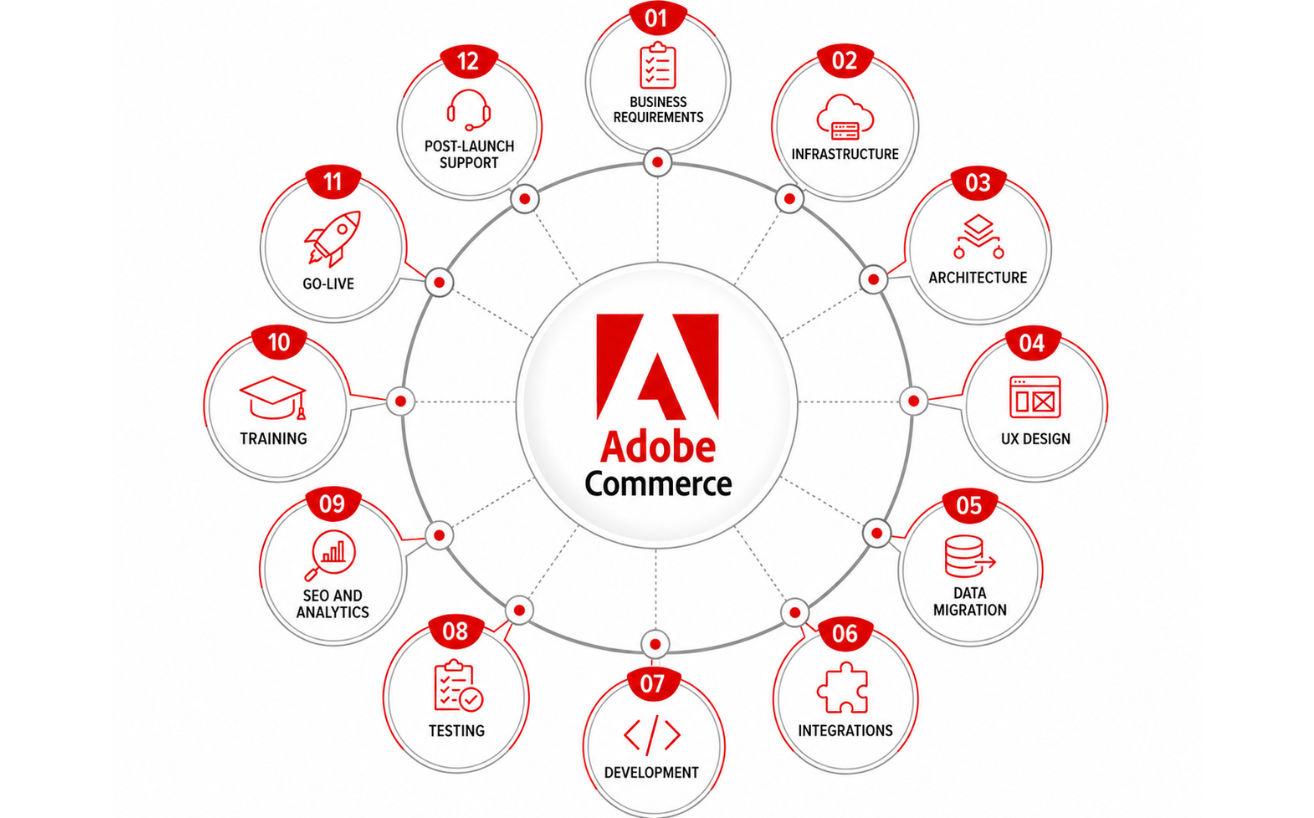
Implementing Adobe Commerce is a significant undertaking for enterprise organizations. Unlike basic eCommerce setups, enterprise implementations involve complex product catalogs, multiple customer segments, integrations with core business systems, and high expectations for security and scalability.
A successful implementation requires a structured approach that covers business planning, technical architecture, data migration, testing, and post-launch optimization. This checklist outlines each essential stage to help enterprise businesses launch a stable and future-ready eCommerce platform.
Define Business Requirements
Every successful implementation begins with a clear understanding of business objectives and operational requirements.
At this stage, stakeholders identify how the platform will support sales, customer service, marketing, and backend operations. This includes determining whether the business operates in B2B, B2C, or both, how many storefronts are needed, and what level of customization is required.
Typical requirements include:
- Multi-store and multi-language capabilities
- Customer-specific pricing and catalogs
- Quote and approval workflows
- Subscription or recurring billing
- Regional tax and shipping rules
- Integration with ERP, CRM, and PIM systems
A detailed requirements document serves as the foundation for project planning and helps ensure all teams are aligned from the beginning.
Choose Hosting and Infrastructure
The hosting environment has a direct impact on site speed, uptime, and security.
Enterprise businesses can deploy Adobe Commerce on Adobe-managed cloud infrastructure or on their own servers. The right choice depends on internal resources, compliance requirements, and expected traffic levels.
Infrastructure planning should address:
- Application and database server sizing
- Content delivery network configuration
- Load balancing
- Backup and disaster recovery
- Security and firewall controls
- SSL certificate installation
A properly configured infrastructure ensures the platform performs reliably during peak traffic and high transaction volumes.
Plan Solution Architecture
Solution architecture defines how the platform will be structured and how it will interact with other systems.
This stage includes selecting extensions, identifying custom development needs, and mapping data flows between Adobe Commerce and external applications.
Architecture planning generally covers:
- Module and extension selection
- API and middleware design
- Catalog and customer data structures
- Authentication and access controls
- Upgrade and maintenance strategy
A well-designed architecture reduces complexity, improves maintainability, and supports future business expansion.
Design User Experience and Interface
The storefront design should balance brand presentation with usability and conversion performance.
Enterprise websites often serve diverse audiences, including retail customers, wholesale buyers, and procurement teams. The interface must support efficient navigation, product discovery, and checkout.
Design activities include:
- Wireframes and prototypes
- Responsive layouts
- Navigation and category structure
- Product page design
- Checkout optimization
- Accessibility compliance
A thoughtful user experience improves engagement and helps customers complete purchases with fewer obstacles.
Prepare Data Migration
Data migration involves transferring information from the existing platform into Adobe Commerce.
This process typically includes product data, customer accounts, order history, content pages, and promotional rules.
Common migration elements include:
- Products and categories
- Customer and company accounts
- Historical orders
- Reviews and ratings
- CMS pages and blog content
Before migration, data should be cleaned and validated to remove duplicates, fix formatting issues, and ensure consistency.
Set Up Third-Party Integrations
Enterprise businesses depend on connected systems to manage operations efficiently.
Adobe Commerce is often integrated with platforms that handle accounting, inventory, marketing, shipping, and customer support.
Typical integrations include:
- ERP systems such as SAP ERP and Oracle NetSuite
- CRM platforms such as Salesforce
- PIM solutions
- Payment gateways
- Shipping and fulfillment tools
- Tax automation software
- Marketing automation platforms
Accurate integrations reduce manual work and keep business data synchronized across departments.
Develop Custom Features and Functionality
Although Adobe Commerce offers extensive native capabilities, enterprise organizations often require features tailored to their workflows.
Custom development may include:
- Approval-based purchasing
- Account-specific catalogs
- Custom pricing logic
- Subscription management
- Specialized checkout steps
- Advanced reporting
Development should follow Adobe best practices and coding standards to preserve performance and simplify future upgrades.
Conduct Testing and Quality Assurance
Testing is essential to ensure the platform functions correctly under real-world conditions.
A comprehensive quality assurance process should validate all business-critical workflows, integrations, and performance benchmarks.
Testing typically includes:
- Functional testing
- Integration testing
- Performance and load testing
- Security testing
- Cross-browser and device testing
- User acceptance testing
Issues identified during testing should be resolved before launch to reduce operational risk.
Configure SEO and Analytics
Search engine optimization and analytics should be configured before the site goes live.
This step helps protect existing rankings and provides visibility into traffic, conversions, and user behavior.
Important tasks include:
- URL redirect mapping
- Meta title and description setup
- XML sitemap generation
- Structured data validation
- Analytics implementation
- Conversion and event tracking
Proper SEO and analytics setup ensures the new store is ready to attract and measure qualified traffic from launch day.
Train Internal Teams
The success of the platform depends on how effectively internal teams can manage it.
Training should be provided to everyone responsible for catalog updates, order processing, customer support, and content management.
Training topics often include:
- Product and category management
- Order and return handling
- Promotional rule creation
- Customer account administration
- Reporting and dashboards
Clear documentation and training reduce dependency on developers for routine tasks.
Prepare for Go-Live
Go-live preparation is the final review before the store is launched.
All technical, operational, and business functions should be tested and approved.
Pre-launch activities include:
- Final data synchronization
- Payment and shipping verification
- DNS updates
- Security checks
- Backup confirmation
- Monitoring and alert setup
A structured launch plan helps ensure a smooth transition with minimal disruption.
Provide Post-Launch Support
The implementation does not end when the website goes live.
Ongoing support is required to monitor performance, resolve issues, and continuously improve the customer experience.
Post-launch activities include:
- Bug fixes and troubleshooting
- Performance optimization
- Security patch installation
- Conversion analysis
- Feature enhancements
Consistent support protects the investment and helps the platform evolve with business needs.
Conclusion
An enterprise Adobe Commerce implementation requires strategic planning, technical expertise, and disciplined execution. Each phase, from requirements gathering to post-launch support, plays a critical role in ensuring the platform meets operational demands and delivers long-term value.
By following this implementation checklist, enterprise businesses can reduce project risks, accelerate deployment, and build a scalable eCommerce solution designed for sustained growth.
Frequently Asked Questions
How long does an Adobe Commerce implementation take?

What is included in an Adobe Commerce implementation?
How much does Adobe Commerce implementation cost?
Why do enterprise businesses choose Adobe Commerce?
What are the biggest challenges in Adobe Commerce implementation?
Uday Tanwar
Uday Tanwar is the CEO of BYXL Software, where he leads a team focused on building custom software, mobile apps, web platforms, and business automation solutions. With years of experience in technology strategy and digital product development, he helps businesses turn ideas into practical, scalable systems that support long-term growth. His expertise includes software consulting, process optimization, and delivering user-focused solutions for startups, small businesses, and growing enterprises. Through his leadership, BYXL Software continues to deliver reliable technology solutions tailored to modern business needs.